Notifications
Overview
SkyPath’s SDK ensures only essential notifications are delivered to pilots. Notifications are not triggered below 10,000 feet to eliminate possible distractions during climb and descent, and the SDK employs a clustering mechanism to prevent repeated notifications and limit the number of notifications overall. Thereby ensuring notifications help to provide pilots with situational awareness without unnecessarily drawing their attention.
Notifications will be searched in locally cached data received per the SkyPath.fetchConfig configuration. No server request will be made here.
Tech Algo
Here is the high-level explanation of the algorithm that is used to search turbulence to notify.
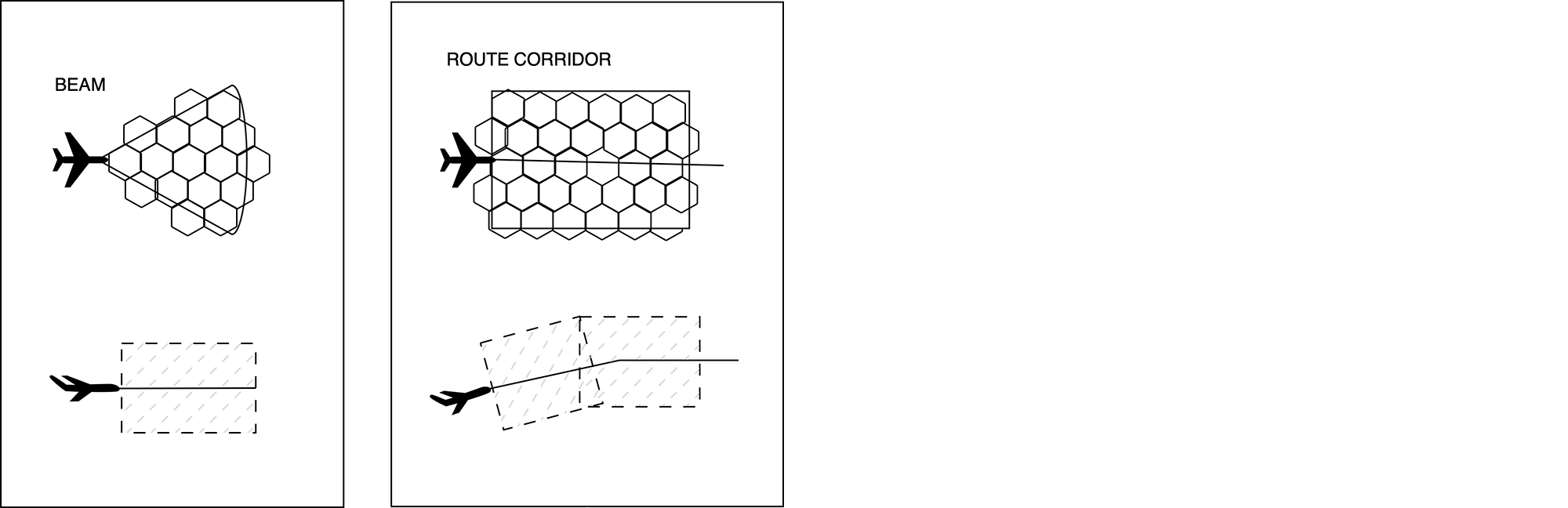
H3 Indexes
Generate an array of H3 indexes in corresponding altitudes to search turbulence to notify in.
Turbulence Reports
Get observed turbulence reports in corresponding H3 indexes and altitudes. Each report has an H3 index and altitude block (in 1,000 ft).
Filter Turbulence
Filter found reports by specified criteria:
- history time (ts)
- min severity (sev)
Notify Nearest
Take and notify on the nearest report based on the distance to and altitude difference from the current altitude. Other reports could be grouped into clusters and visualized.
Notify Logic
- Distance ahead - 100NM
- Vertical span - 4 altitude blocks (4,000 ft total), example at FL380 would be
FL360..<FL400 - Route mode - If there’s a route in place then:
- 40 NM total width around the route (
NotificationQuery.routeWidth) - Similar vertical span corridor on the entire route including climb and descent
- 40 NM total width around the route (
- Beam mode - If not, go into beam mode
- 15 degrees horizontal span, fixed and not configurable
- Similar vertical span
Query
By default, SDK will use a predefined configuration for searching turbulence notifications, see NotificationQuery for more details. So it will be a good start to use the default values of NotificationQuery().
Turbulence notifications are delivered by monitoring. SDK will check for turbulence on every new location update. When found, a notification will be reported via SkyPathDelegate.didReceiveNotification(_:). This will not report the same turbulence notification multiple times in a row, but it could report the same notification that was reported previously if there were other notifications in between. So it will report only once in cases A1 A1 A1 A1 but will report 3 times in cases A1, A2, and A1.
let query = NotificationQuery(altRange: altRange, route: route?.coordinates)
SkyPath.shared.startMonitoringNotifications(with: query)
altRange bounds are rounded to a thousand feet internally, so there is no need to round them yourself. When altRange is not set, the SDK searches around the current altitude instead, NotificationQuery.altBlock tiles above and below it.
When the NotificationQuery changes you can call only startMonitoringNotifications(with:) with a new query without stopping it first.
There is no way to query notifications on demand. Monitoring via startMonitoringNotifications(with:) and SkyPathDelegate.didReceiveNotification(_:) is the only way to get them.
Based on the NotificationQuery properties, SDK filters server reports. All NotificationQuery properties have default values, minSev defaults to .light. Configure it per your needs.
The reports of a notification are available in NotificationResult.observations for observations, and in NotificationResult.oneLayer for OneLayer.
There are two modes: route and beam.
-
Route mode is used when route line coordinates or a polygon are set in the query. It can use polygon, or route line coordinates with
NotificationQuery.routeWidthto make a corridor.routeWidthis the total width of the corridor, from its left edge to its right edge, and defaults to 40 NM. -
Beam mode is used when neither a route nor a polygon is provided. It is configured by
NotificationQuery.distancefrom the current location, with a fixed 15 degrees angle span. The SDK also switches to beam mode automatically when the current position is far from the route line.
When you get a turbulence notification you can show it in the app with the local iOS notification if the app is in the background. Let SDK know that notification has been presented by:
SkyPath.shared.reportAppEvent(
    .notifiedTurbulence(
        severity: sev,
        coordinate: coordinate,
        altFt: altFt,
        dataSource: dataSource))
It is safe to call startMonitoringNotifications and stopMonitoringNotifications multiple times. However, it works as enable disable, so there is no need to call it again after starting monitoring until it stops monitoring and needs to start again. You can also check SkyPath.shared.isMonitoringNotifications if you need to call startMonitoringNotifications or stopMonitoringNotifications.
Clustering
Due to a lot of reports, notifications can be provided frequently. To make pilot notifications more consistent and less frequent, group the reports into clusters with TurbulenceClusterer and notify about a cluster instead of each item.
private let clusterer = TurbulenceClusterer()

// SkyPathDelegate
func didReceiveNotification(_ notification: NotificationResult) {

    clusterer.process(turbulence: notification.observations)

    for cluster in clusterer.clusters where !clusterer.isNotified(cluster: cluster) {
        // notify the pilot about `cluster.severity` at `cluster.center`
        clusterer.notified(cluster: cluster)
    }
}
TurbulenceClusterer.Options configures the grouping distances, maxDistanceNM (60 NM by default) and maxDistanceToNearestNM (30 NM by default).
Each TurbulenceCluster provides center, severity, diameterDistance, distanceTo, timeTo, timeToPass and nearestMaxSevTurbulence. Use isNotified(cluster:) and notified(cluster:) to avoid notifying the same reports again when they move between clusters.
process(turbulence:) accepts [any TurbulenceItemable], so it works with both NotificationResult.observations and NotificationResult.oneLayer. Call reset() when you stop monitoring notifications or the route changes.
Background
Background mode is required to keep using location and searching for notifications while the app is running in the background.
Schedule an iOS local notification with corresponding information when got a turbulence notification while the app is running in the background. The SDK does not schedule local notifications, use Apple's UserNotifications framework in your app.
let content = UNMutableNotificationContent()
content.title = "Moderate Turbulence Detected"
content.body = "In 10 mins"

let request = UNNotificationRequest(
    identifier: UUID().uuidString,
    content: content,
    trigger: nil)

UNUserNotificationCenter.current().add(request)
Test
To test the notification you need to simulate a flight towards some turbulence area that meets NotificationQuery criteria (see the SDK API docs for more details), so the turbulence reports will be in the query corridor altitude, proper severity, etc. The following will describe the simple steps for testing using the default NotificationQuery parameters.
-
Find on the map some turbulence hexagons with a Moderate severity level at an altitude of, for example, ~38,000 ft.
-
Simulate a flight to fly at ~38,000 ft (same hexagon turbulence report altitude, so report will be within searching altitude corridor) towards that Moderate turbulence hexagon on a distance of more than 100 NM, for example, 150-200 NM.
-
By default, turbulence notifications are searched in a beam mode within 100 NM ahead, so when you fly at a distance closer than 100 NM the hexagon turbulence will be in range. Make sure that based on the current speed, it will require at least a few minutes to cover this distance.
-
The turbulence notification should arrive.
-
Move the app to the background and test showing a local notification.
These quick steps are valid if the default query parameters are used. Please take into account any customizations you made in NotificationQuery for testing. For example, if the severity of notification is set to Moderate-Severity and above, you'll need to find a corresponding Moderate-Severity hexagon, and so on.